Journey Weather
Pulsacell DevWeather
4.420.00 Reviews
- Version
- 1.2.6
- Installs
- 100.00K
- Age Rating
- Everyone
Screenshots
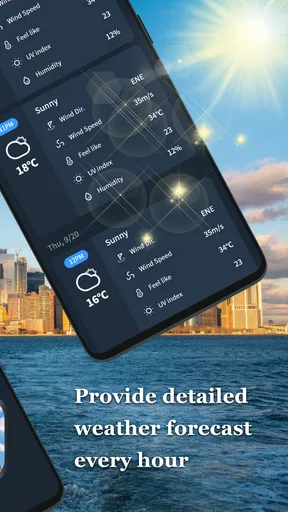
Our Review of Journey Weather
 Analysis by Appyee
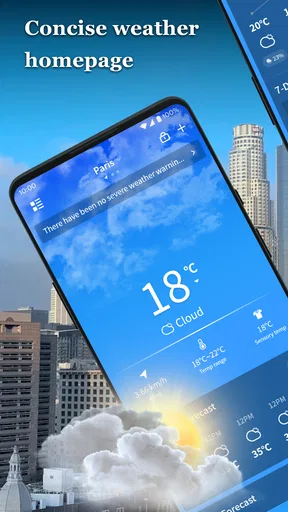
Journey Weather is the kind of weather app I can imagine keeping on my phone for one simple reason: it focuses on the forecast window most people actually use. Instead of making me dig through a crowded dashboard, it is built around checking conditions across the next seven days. That makes it easy to understand before a commute, a weekend plan, or a short trip, especially when I want a quick answer rather than a wall of meteorological detail.
My first impression is that this is a practical choice for everyday planning, not a specialist weather station. Pulsacell Dev has positioned it as a free weather app for everyone, and the current version, 1.2.5, keeps the experience approachable for people using Android 7.0 or later. It has reached over one hundred thousand installs and holds a 4.5 average from roughly five hundred ratings, which suggests that its straightforward purpose is connecting with a real audience.
What to expect before you rely on the forecast
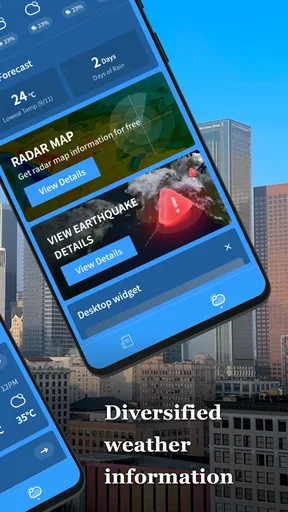
The main promise is easy to understand: open the app, look ahead, and use the seven-day view to decide what to do. I like that focus because many weather tools try to serve casual users and weather enthusiasts at the same time. They add radar layers, alerts, hourly graphs, air-quality panels, widgets, and other extras until the basic forecast becomes harder to read. Journey Weather feels better suited to someone who wants a usable overview without turning a morning check into a research session.
That simplicity also sets a clear boundary. I would use it to decide whether to carry an umbrella, when to wash the car, whether an outdoor lunch looks sensible, or how to pack for a few days away. I would not make it my only source for a safety-critical decision, a long expedition, or a situation where I need highly specialized warnings and detailed weather maps. A focused seven-day outlook is useful, but it is not the same thing as a full professional forecasting toolkit.
The app’s name hints at travel, and that is where I find the concept especially useful. Before leaving for a short journey, I can think through each day rather than checking only the current conditions. A warm afternoon followed by a wet evening may change what I pack, while a cooler first day could affect clothing and transport plans. The value is not in staring at the forecast; it is in turning that forecast into a small, practical decision.
The best way to approach Journey Weather is as a planning companion, not an authority that removes uncertainty. Weather can change, and a seven-day prediction naturally becomes less dependable the farther ahead I look. I treat the distant days as a rough planning signal and give more weight to the nearer forecast when the decision matters.
Who will get the most from it
I think this app is a good match for first-time weather-app users, families planning ordinary activities, commuters who want a quick glance, and travelers who prefer a clean forecast period over a collection of technical tools. It also makes sense for anyone using an older compatible Android phone, since the minimum operating system is Android 7.0 rather than a recent release that would exclude older devices.
The free price removes the usual hesitation around trying it. I can install it, see whether the seven-day presentation fits my routine, and decide from actual use rather than committing money first. Its Everyone content rating also makes it suitable for a broad household audience, including people who want something uncomplicated for a shared family device.
I would skip it if my daily routine depends on minute-by-minute rain timing, detailed storm tracking, specialist aviation information, or a deep archive of climate observations. In those cases, a more advanced weather service may be the better tool. I would also look elsewhere if I wanted a highly personalized home screen with extensive widgets and automation, because Journey Weather’s appeal is its direct forecast experience rather than a large ecosystem of add-ons.
Starting with the first setup
The first useful step is to decide how I will use the app. If I mainly want to check the weather where I live, I can begin with my regular location. If I am preparing for a trip, I should think of the destination as the place that matters most during that planning session. This small change in mindset prevents a common mistake: opening a travel-focused weather app while still looking only at home conditions.
I would keep the first session deliberately simple. I would open the forecast, identify the location being shown, and then scan the full seven-day period from left to right. I would not try to memorize every symbol or make a decision based on one isolated detail. The useful question is, “What pattern do I see across the days?” That might reveal a consistently dry stretch, a colder turn, or one day that deserves a backup plan.
For a first-time user, the most important reassurance is that there is no need to become a weather expert before using the app. Start with the day you care about, then compare it with the surrounding days. If the forecast looks stable, planning is easier. If it changes sharply from one day to the next, that is a good reason to keep plans flexible and check again closer to the event.
One practical habit is to use the seven-day view as a weekly planning checkpoint. I might check it at the beginning of the week, note the days that look promising for outdoor tasks, and then revisit the nearer dates before making firm arrangements. This is more useful than repeatedly opening the app without a question in mind. The forecast becomes a planning tool instead of background information.
The first meaningful success
My definition of success with Journey Weather is not simply seeing the screen. It is making one better decision because the forecast is easy to read. For example, imagine I need to travel for a family visit. I check the destination’s outlook, notice that the middle of the trip appears less comfortable than the surrounding days, and adjust the outdoor activity rather than discovering the problem after arriving. That is a small outcome, but it is exactly the kind of outcome a focused weather app should support.
Another realistic example is planning laundry or a walk. Instead of waiting for the current sky to answer the question, I look across the coming days and choose the most suitable window. If the forecast is uncertain, I keep a second option ready. The app does not make the choice for me, but its seven-day emphasis makes the comparison quick enough to be useful.
For travel packing, I find it helpful to separate essentials from optional items. I would use the forecast to identify broad conditions across the journey, then pack one adaptable layer or a compact rain solution if the outlook is mixed. This avoids overreacting to a single day while still acknowledging that plans can change. It is a better workflow than treating every forecast icon as a guarantee.
A less obvious benefit is reducing decision fatigue. When an app presents the coming days in one coherent view, I do not have to remember separate checks for each date. I can compare the trip as a whole, which is especially helpful when arranging transport, outdoor appointments, or activities involving several people. The simpler interface becomes valuable because it supports a sequence of decisions, not just one glance.
Where new users may hesitate
The first possible confusion is the difference between a forecast and a promise. A seven-day view is excellent for spotting trends, but the later days should not be treated with the same confidence as the immediate ones. I use the far end of the forecast for broad preparation and the near end for final decisions. That distinction is easy to miss when every day is displayed together.
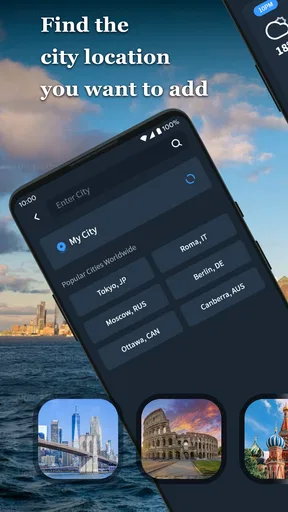
Another source of friction is location context. Before acting on what I see, I make sure the forecast is for the place relevant to my plan. This is particularly important when I am traveling or comparing home with a destination. A forecast can be perfectly clear and still be unhelpful if I am viewing the wrong location.
Weather icons can also encourage overly quick conclusions. A symbol gives me a summary, not the complete story of how a day will feel or how conditions may affect a particular activity. I would use the app to begin planning, then apply common sense: a short outdoor event may tolerate a cloudy day, while a long walk or open-air gathering may need a clearer margin.
There is also a trade-off between clarity and depth. Journey Weather’s narrow purpose helps me find the main forecast quickly, but a user expecting layers of technical information may find the experience too limited. That is not necessarily a flaw; it simply means the app works best when the question is “Which day looks most suitable?” rather than “Can I investigate every aspect of the atmosphere?”
Turning the forecast into a repeatable routine
After the first successful check, I would build a two-stage routine. First, use the seven-day outlook to make flexible plans. Second, return to the closer dates before committing time, money, or other people’s schedules. This approach makes the app useful without pretending that long-range forecasts are fixed. It also gives the app a role in both weekly planning and final preparation.
For a trip, I would check the destination early, identify the most weather-sensitive part of the itinerary, and prepare an alternative for that portion. If the forecast later improves, the backup can be discarded. If it worsens, I am not starting from zero. This is one of the strongest ways to use a simple forecast tool: let it guide preparation rather than dictate every detail.
For home routines, I would use the same method with smaller decisions. Choose a likely day for errands, outdoor chores, or a walk, then confirm conditions closer to the time. The app’s value grows when I connect it to a specific decision. A forecast that I never use is just information; a forecast that changes when I do something is genuinely helpful.
I also appreciate that the app is free because it lowers the cost of experimenting with this routine. Someone who normally relies on a quick search or a built-in phone weather panel can compare the experience without paying first. The question is not whether it contains every possible weather feature, but whether its seven-day presentation is easier for that person to use consistently.
Compared with a general search engine, Journey Weather offers a more dedicated place to review the coming week. Compared with a phone’s basic weather panel, its appeal is the travel-minded focus and the emphasis on looking across several days. Compared with advanced weather apps, it gives up depth for approachability. I would choose it when speed and a clear planning horizon matter more than radar, specialist alerts, or extensive customization.
What I would check before making it my only weather app
I would spend a few ordinary days testing whether the displayed forecast matches the locations and decisions I care about. I would check it in the morning, revisit a planned outdoor activity later, and see whether the seven-day view helps me act rather than merely browse. This trial is more revealing than reading a feature list because weather apps are personal: the right amount of information differs from one user to another.
I would also consider how much detail I need during unusual conditions. For normal commuting, shopping, walking, and short travel, the app’s focused design should be comfortable. During severe or rapidly changing weather, I would consult official local guidance and a more specialized source if necessary. That is sensible with any forecast app, and it is especially important when the app is designed around a concise weekly overview.
The current release, 1.2.5, is the version I would expect a new user to encounter, and the broad device support makes it accessible to people who are not carrying the newest phone. I like that the basic proposition is understandable immediately: install a free weather app, look ahead, and use the forecast to prepare. There is no need to invent a complicated workflow around it.
My recommendation after using it
Journey Weather works best when I want a calm, practical answer to a planning question. Its strongest quality is not an abundance of tools; it is the way a seven-day horizon encourages me to think ahead. That makes it particularly suitable for first-time users who may feel overwhelmed by weather apps packed with charts and controls.
Its limitations are equally clear. Users who need advanced monitoring, highly detailed short-term information, or specialist weather analysis should choose a deeper alternative. The app also cannot remove the uncertainty built into looking several days ahead. I would keep my expectations realistic and use the later part of the forecast as guidance rather than certainty.
For everyone else, I think the free download is easy to justify. Pulsacell Dev has made a weather app that can earn a place in a routine through a simple success: helping me choose a better day, pack more sensibly, or prepare a backup plan. If that is the kind of weather information you actually need, Journey Weather is worth trying.
Privacy and Permissions
See what permissions an app requests and how it handles your data.
- Location
- approximate location (network-based), precise location (GPS and network-based)
- Wi-Fi connection information
- view Wi-Fi connections
- Other
- view network connections, disable your screen lock, full network access, run at startup, control vibration, prevent device from sleeping, Google Play license check
Verdict
Strengths of Journey Weather
- Clean interface makes forecasts easy to scan quickly.
- Provides useful weather details for planning daily activities.
- Location-based forecasts reduce the need for manual searches.
- Works well for checking conditions while traveling.
- Weather information is presented in a simple, accessible format.
Limitations of Journey Weather
- Some advanced features may require a subscription or in-app purchase.
- Forecast accuracy can vary depending on location and data coverage.
- Frequent alerts may feel excessive unless notification settings are adjusted.
- The app may use additional battery when location tracking is enabled.
- Limited customization could disappoint users wanting highly detailed layouts.
Similar Picks in This Category
View All
Weather - By Xiaomi
Xiaomi Inc.4.1

Weather & Radar Forecast
WetterOnline4.8

Weather
OneLouder Apps4.6

AccuWeather: Weather Radar
AccuWeather3.6

The Weather Channel - Radar
The Weather Channel4.6

1Weather Forecasts & Radar
OneLouder Apps4.3
Frequently Asked Questions
What is Journey Weather, and what can I use it for?
Journey Weather is designed to help travelers plan trips around expected weather conditions. It can provide weather information for destinations and travel dates, making it easier to decide when to go, what to pack, and whether outdoor activities may need to be adjusted. It is most useful as a planning aid rather than a replacement for official weather warnings.
How accurate are Journey Weather forecasts?
Forecast accuracy depends on the destination, forecast range, local weather patterns, and the quality of available meteorological data. Short-term forecasts are generally more dependable than predictions several weeks ahead, especially in areas with rapidly changing conditions. You should treat longer-range results as guidance and check updated forecasts before traveling or making important outdoor plans.
Does Journey Weather cover international destinations?
Journey Weather is intended for people planning trips to different destinations, including locations outside their home country. Coverage can vary depending on the region and the weather data available there. Before relying on the app for a specific journey, search for your destination and confirm that it provides the forecast details, dates, and location information you need.
Does Journey Weather require an internet connection or access to my location?
An internet connection may be needed to search for destinations, retrieve updated forecasts, and display current weather information. Location access may be optional if you enter a destination manually, although allowing it can make finding nearby locations more convenient. Review the app’s permission requests carefully and disable location access if you prefer to manage destinations yourself.
Is Journey Weather free to download, and are there any extra costs?
The app’s download availability, included features, advertising, and premium options can differ between Android and iOS and may change with future updates. Check the relevant app store listing before installing to see whether Journey Weather includes subscriptions, in-app purchases, or paid features. If a trial is offered, review its renewal terms before confirming it.
